CHANGELOG

What’s new in Snagit?

Turn on your auto-updates because our team is always cooking up something fresh.

Filter posts

Clear filters

Release Type

Operating System

Tags

May 2024

Improved Video Management, Text Spacing, and Screencast Sharing

  • Added a tray to the combine videos window to make it easier to identify and reorder selected videos.
  • Updated the Google Drive share destination to only send to a TechSmith folder to meet increased Google security standards.
  • Improved page breaks to not cut off content when printing or saving templates as a PDF.
  • Added line spacing property to the text and callout tools.
  • Improved sharing to Screencast to allow Snagit use during optimization.
  • Updated messages when sharing to Screencast to reflect unlimited video hosting for Screencast Pro accounts.
  • Snagit now shows a warning if autosave fails for .snagx files.
  • Snagit
    MacOS
    EditingCollaboration
    2024.2.5

    Experimental Feature Improvements

    Be a part of shaping Snagit’s roadmap by trying out our exciting new developments! Turn features on and off via the Experiments tab in Snagit Settings, and let us know what you think with the Submit Feedback button.

  • Improved smart highlight accuracy on images that have effects applied.
  • Updated the canvas corner radius control to not overlap with the canvas resizing control.
  • Canvas corner radius now works with the border and capture info effects.
  • Improved performance of live measure by 3x.
  • Snagit
    MacOS
    Screen CaptureEditing
    2024.2.5

    Faster Auto-Fill and Optimized Screencast Sharing

  • Improved performance of selection auto-Fill by 3x.
  • Improved optimization for smaller videos when sharing to Screencast.
  • Snagit
    MacOS
    EditingCollaboration
    2024.2.5

    Resolved Crashes, Scrolling Capture, and Alignment Issues

  • Fixed an issue where the “Save As” dialog could become unresponsive in certain workflows.
  • Fixed a crash that could occur if the Dropbox share setting “Ask for filename and location each time” is disabled.
  • Fixed automatic scrolling capture and window snapping to work with recent updates to Google Chrome.
  • Fixed an issue where the scrolling capture toolbar could sometimes appear in image captures.
  • Fixed the “Evenly” alignment option to distribute objects within the selection rather than across the canvas.
  • Fixed an issue where video durations could appear as 00:00 when the library location is set to OneDrive.
  • Fixed the display of tool property text in French installations of Snagit.
  • Snagit
    MacOS
    Screen CaptureEditingCollaboration
    2024.2.5

    April 2024

    ABBY License File Fixed

    Fixed an issue with ABBY license file.

    Snagit
    Windows
    Editing
    2024.1.3
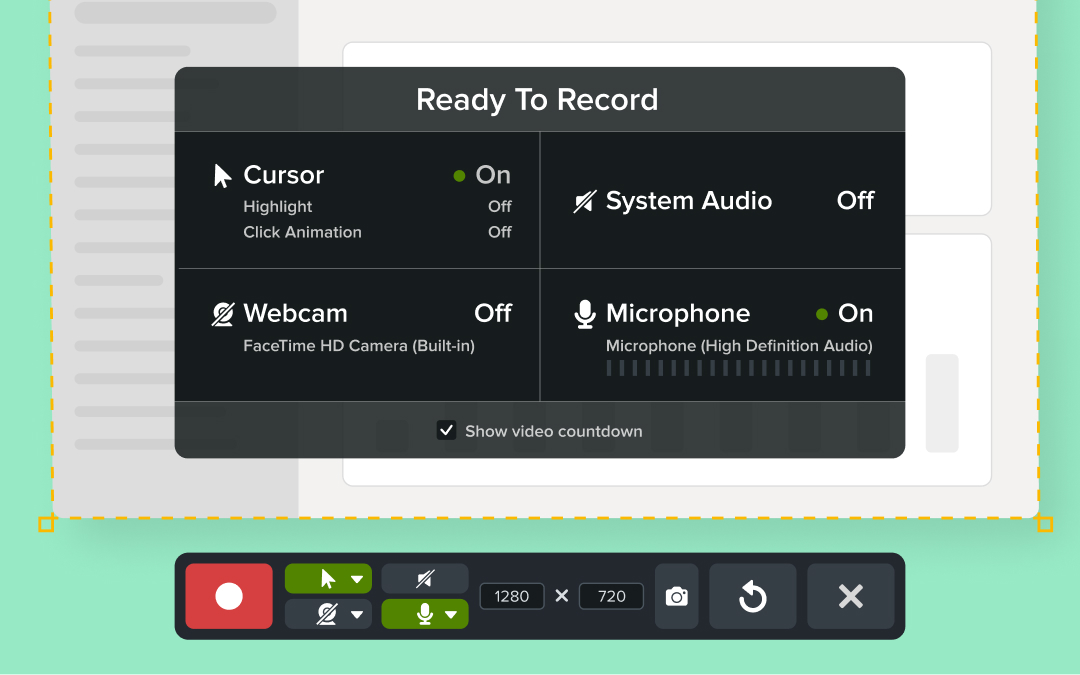
    Snagit's "Read Record" window highlighting the various set up options available to the user.  options for

    Confirm Your Setup with the New Ready to Record Window

    Snagit’s new ready to record window lets you review settings and device selections before starting your recording.

    Snagit now offers a subscription-based licensing option, giving you affordable access to all the tools you need. With a lower initial cost and automatic updates, you’ll always have the latest features and improvements at your fingertips.

    💙 Why you’ll love having a Snagit subscription:

  • Reduce upfront costs with a budget-friendly subscription option.
  • Enjoy seamless access to the newest features and updates.
  • Simplify license management with predictable annual billing.
  • Discover how Snagit’s subscription model keeps you ahead of the curve!

    Snagit
    Windows
    Screen RecordingScreen Capture
    2024.1.2

    Updated Accessibility, File Sharing, and Pixel Accuracy

  • Added an option to set the default file type when dragging and dropping image files from the recent captures tray or Snagit library to other applications. This is available on the Advanced tab of Snagit editor preferences.
  • Updated the Google Drive share destination to only send to a TechSmith folder to meet increased Google security standards.
  • Dropdown menu titles in Snagit capture are now available to screen readers for improved accessibility.
  • Added support for common keyboard shortcuts
  • Updated image and scrolling captures taken in all-in-one mode to no longer round to an even number of pixels.
  • Snagit
    Windows
    Screen RecordingScreen CaptureEditingCollaboration
    2024.1.2

    Enhanced Performance During Updates and Exit Processes

  • Addressed excessive CPU usage when Snagit was minimized and a software update was available.
  • Fixed an issue where Snagit could sometimes appear to freeze when exiting the application.
  • Snagit
    Windows
    Screen RecordingScreen Capture
    2024.1.2

    Improved Security and New Installer Options for IT Admins

  • Updated WiX to version 3.14.1. This addresses CVE 2024-29187, where a local attacker could elevate privileges when the Snagit installer is running, and CVE 2024-29188, where a local attacker could elevate privileges to delete files when the Snagit installer is running.
  • Added an option to the Snagit Installer to exclude Microsoft SQL CE libraries.
  • Added a new property to the Snagit MSI installer. TSC_UPDATER_PROXYLIST_VALUE allows admins to specify a custom proxy server list for the auto-updater to use when downloading new updates.
  • Updated OpenCV license type in Snagit documentation to reflect current usage.
  • Updated Zlib library to version 1.3.1.
  • Snagit
    Windows
    IT and Security
    2024.1.2

    Resolved Startup Crashes, Cropping Issues, and Tag Filtering

  • Fixed a rare crash that could occur on startup if share destinations are not initialized correctly.
  • Fixed the library to correctly filter for tags that include apostrophes.
  • Fixed an issue where the canvas could be cropped unexpectedly.
  • Fixed an issue where pasted objects might be unintentionally cropped if the preference to automatically flatten pasted images is selected.
  • Fixed an issue where some photos could be distorted in the account drop-down.
  • Fixed an issue where items removed from share history could return after restarting Snagit.
  • Snagit
    Windows
    EditingCollaboration
    2024.1.2