


Add Captions in Screencast (English Only)
Learn how to automatically generate and edit captions for videos uploaded to Screencast.

Learn how to automatically generate and edit captions for videos uploaded to Screencast.

For Screencast Pro accounts, captions are automatically generated based on the audio transcription for any videos uploaded to Screencast (English only).
Your viewers can click the CC button to view the closed captions.
Viewers can also click the Transcript tab on the Comments pane to view the transcript.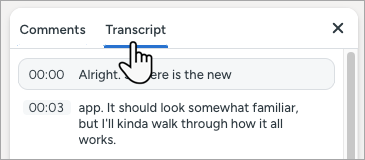
You can automatically generate captions for videos you uploaded to Screencast prior to having Screencast Pro or before this feature was available.
 Add Caption Track button.
The captions status changes from Transcribing to Published when ready. 
Note: To stop auto-generating captions for new video uploads, click  in the upper-right corner > Settings > turn off Generate captions after upload toggle.
Complete the following to edit your published captions, including auto-generated captions (Screencast Pro).
 Edit button.

 Delete Caption button.
  Add Caption button.
 Split Caption button. For example, split captions if the duration or character count is longer than the ADA-recommendations.
  ADA button to view tips to make your captions compliant with the Americans with Disabilities Act (ADA).
The Accessibility tab indicates that captions were last modified by you.
 Add Caption button.